





Knowledge base
Blog
Services
  • Aerial Photography
    • UAV Monitoring & Inspections
    • UAV Photogrammetry
  • Laser Scanning
    • Aerial Laser Scanning
    • Quarry Surveying
    • Topographical Surveying
  • Training
    • UAV Pilot Course: Photogrammetry & ALS
Company
  • Staff
  • News
  • Reviews
  • Vacancy
  • Licenses
  • Documents
  • Partners
Information
  • Requisites
Brands
Contacts
    +41 21 588 02 11
    +41 21 588 02 11 09:00-18:00 whatsapp.svg
    Sales [email protected] email.png
    Support [email protected] email.png
    Telegram Channel @topodronesa tg.svg
    Telegram Chat @topodronesagroup tg.svg
    Telegram Bot @topodronecombot tg.svg
    Facebook @topodronesa ycz1c9257s6gh7g315r8q6tob3bnddba.png
    Youtube @topodronesa youtube.png
    LinkedIn @topodrone 9ratq3v3eavnhupo1akvxp0sbx4vopj5.png
    X @topodrone twitter.png
    Instagram @topodrone tpxkj71axu6dxt423lwj5idzwcej1njx.png
    Email
    [email protected] - Sales
    [email protected] - Support
    The address
    TOPODRONE SA, Rue de la Gare 13, 1820 Montreux, Switzerland
    Working hours
    10:00-18:00
    TOPODRONE
    SPH Engineering
    3Dsurvey
    Velodyne
    DJI
    GreenValley International
    Honeywell
    Fixar
    Blue Marble Geographics
    Sony
    Agisoft
    EMLID
    Pix4D
    Autel Robotics
    SHAREUAV
    • LiDAR
      LiDAR
      • Aerial Survey LiDAR
      • SLAM Survey LiDAR
      • LiDAR Accessories
    • Bathymetry
      Bathymetry
    • Photogrammetry
      Photogrammetry
      • Mapping Drones
      • Drone Mapping Cameras
      • VTOL Mapping Cameras
    • PPK Upgrade Kits
      PPK Upgrade Kits
      • PPK for Drones
      • PPK for any UAV
    • Spectrography
      Spectrography
      • Thermal
      • Multispectral
    • UAV
      UAV
      • DJI
      • Autel Robotics
      • FIXAR
      • Innotech drone
    • Payload
      Payload
      • Aerial Survey LiDAR
      • Bathymetric Scanner
      • Photogrammetric Cameras
      • Thermal Cameras
      • Multispectral Cameras
      • Beacon
    • Software
      Software
      • TOPODRONE
      • UgCS
      • Agisoft
      • 3Dsurvey
      • LiDAR360
      • DJI
      • PIX4D
    • GNSS Equipment
      GNSS Equipment
      • EMLID
      • DJI
    TOPODRONE – LiDAR & UAV Survey
    Log in
    0 Comparison
    0 Favorites
    0 Cart
    TOPODRONE – LiDAR & UAV Survey
    Log in
    0 Comparison
    0 Favorites
    0 Cart
    TOPODRONE – LiDAR & UAV Survey
    Telephones
    +41 21 588 02 11 09:00-18:00 whatsapp.svg
    Sales [email protected] email.png
    Support [email protected] email.png
    Telegram Channel @topodronesa tg.svg
    Telegram Chat @topodronesagroup tg.svg
    Telegram Bot @topodronecombot tg.svg
    Facebook @topodronesa ycz1c9257s6gh7g315r8q6tob3bnddba.png
    Youtube @topodronesa youtube.png
    LinkedIn @topodrone 9ratq3v3eavnhupo1akvxp0sbx4vopj5.png
    X @topodrone twitter.png
    Instagram @topodrone tpxkj71axu6dxt423lwj5idzwcej1njx.png
    Email
    [email protected] - Sales
    [email protected] - Support
    The address
    TOPODRONE SA, Rue de la Gare 13, 1820 Montreux, Switzerland
    Working hours
    10:00-18:00
    0
    0
    0
    • Cabinet
    • 0 Compare
    • 0 Favorite
    • 0 Cart
    • Brands
    • Sales
    • Services
      • Services
      • Aerial Photography
        • Aerial Photography
        • UAV Monitoring & Inspections
        • UAV Photogrammetry
      • Laser Scanning
        • Laser Scanning
        • Aerial Laser Scanning
        • Quarry Surveying
        • Topographical Surveying
      • Training
        • Training
        • UAV Pilot Course: Photogrammetry & ALS
    • Company
      • Company
      • Staff
      • News
      • Reviews
      • Vacancy
      • Licenses
      • Documents
      • Partners
    • Blog
    • Information
      • Information
      • Requisites
    • Contacts
    +41 21 588 02 11 09:00-18:00
    • Telephones
    • +41 21 588 02 11 09:00-18:00
      whatsapp.svg
    • Sales [email protected]
      email.png
    • Support [email protected]
      email.png
    • Telegram Channel @topodronesa
      tg.svg
    • Telegram Chat @topodronesagroup
      tg.svg
    • Telegram Bot @topodronecombot
      tg.svg
    • Facebook @topodronesa
      ycz1c9257s6gh7g315r8q6tob3bnddba.png
    • Youtube @topodronesa
      youtube.png
    • LinkedIn @topodrone
      9ratq3v3eavnhupo1akvxp0sbx4vopj5.png
    • X @topodrone
      twitter.png
    • Instagram @topodrone
      tpxkj71axu6dxt423lwj5idzwcej1njx.png
    • [email protected] - Sales
      [email protected] - Support
    • TOPODRONE SA, Rue de la Gare 13, 1820 Montreux, Switzerland
    • 10:00-18:00
    Main
    Company
    News
    Software TOPOSETTER 2.0

    Software TOPOSETTER 2.0

    28 November 2019

    TOPOSETTER 2.0 is an easy-to-use software for automatic GNSS data postprocessing, images geotagging and replacing navigation coordinates in EXIF tags of images with exact coordinates obtained after post-processing GNSS data. 

       Main features:

    • GNSS data conversion from UBX format to Rinex
    • GNSS data postprocessing
    • Automatic images and coordinates matching
    • Adjust x, y, z, antenna offset  
    • Antenna tilt adjustment using drone IMU data 
    • Correction x,y position of photos due to shutter speed 
    • Writing accurate position x,y,z, as well as horizontal and vertical accuracy to photos, EXIF tags or in text file, supported by AGISOFT METASHAPE, Pix4Dmapper, Bentley Context Capture software
    • JPG, TIFF, DNG format support 
    • Works great with all range of TOPODRONE PPK systems (DJI PHANTOM 4 PRO PPK, DJI MATRICE 200/210 PPK, DJI INSPIRE V2 PPK, DJI MAVIC 2 PRO PPK)  

    The trial version of this software can be downloaded from here.

    User manual:

    Data preparation

    • Remove SD card with images from a drone and copy photos to your computer.
    • Divide the whole images dataset into separate flights and store the photos in separate folders. 
    NOTICE. Do not delete any images
    • Remove the SD card from GNSS receiver, installed on the drone, and copy ubx files to your computer to a folder ROVER (for example).
    • Download GNSS static logs from a base station and convert them into Rinex format. Copy Rinex files to a folder BASE (for example).
    • Measure coordinates of ground control points (GCPs) and coordinates of the base station. 
    NOTICE. Coordinates of the base station should be in Latitude, Longitude, Ellipsoid high, WGS 84 coordinate system.
    Step 1. Run TOPOSETTER 2.0 application
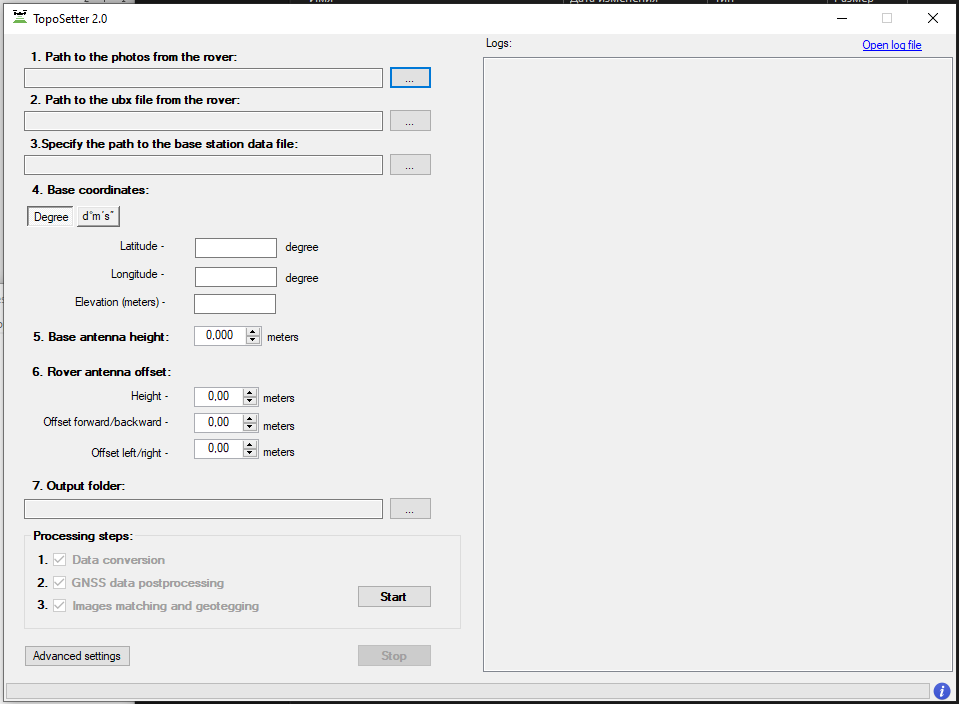
    03
    Step 2. Select the folder with photos
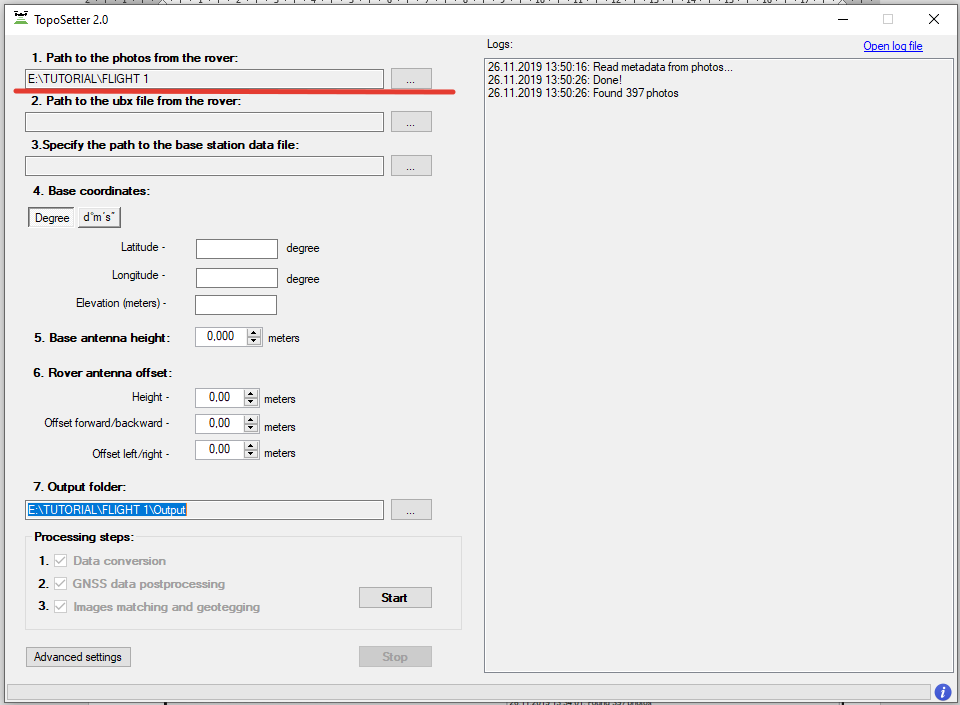
    04
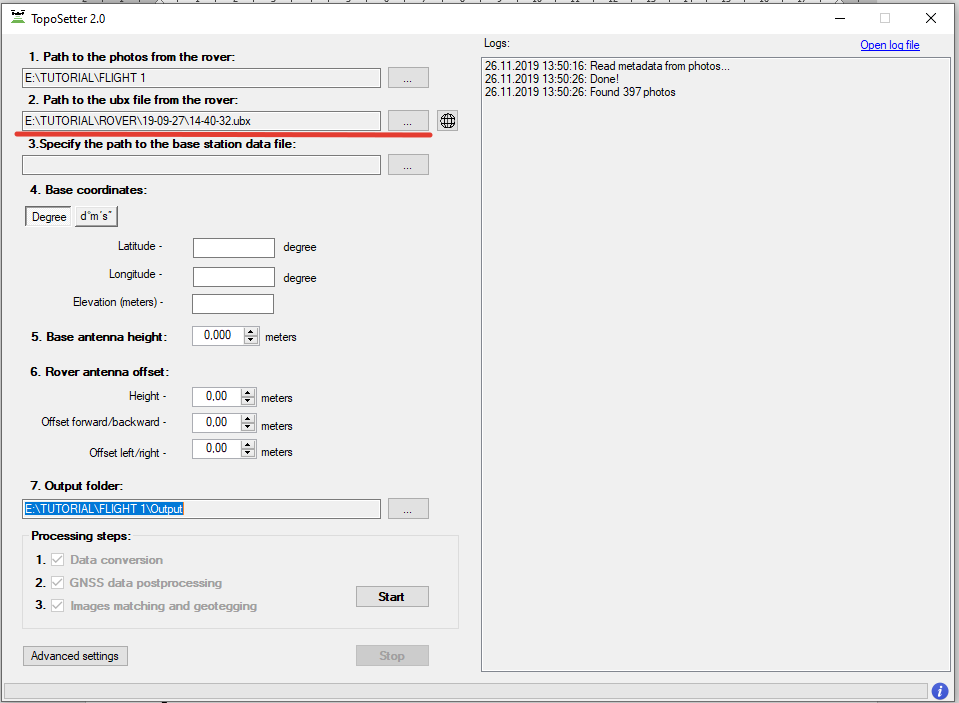
    Step 3. Select UBX file from a drone 
    02
    Step 4. Select Rinex or UBX file from a base station
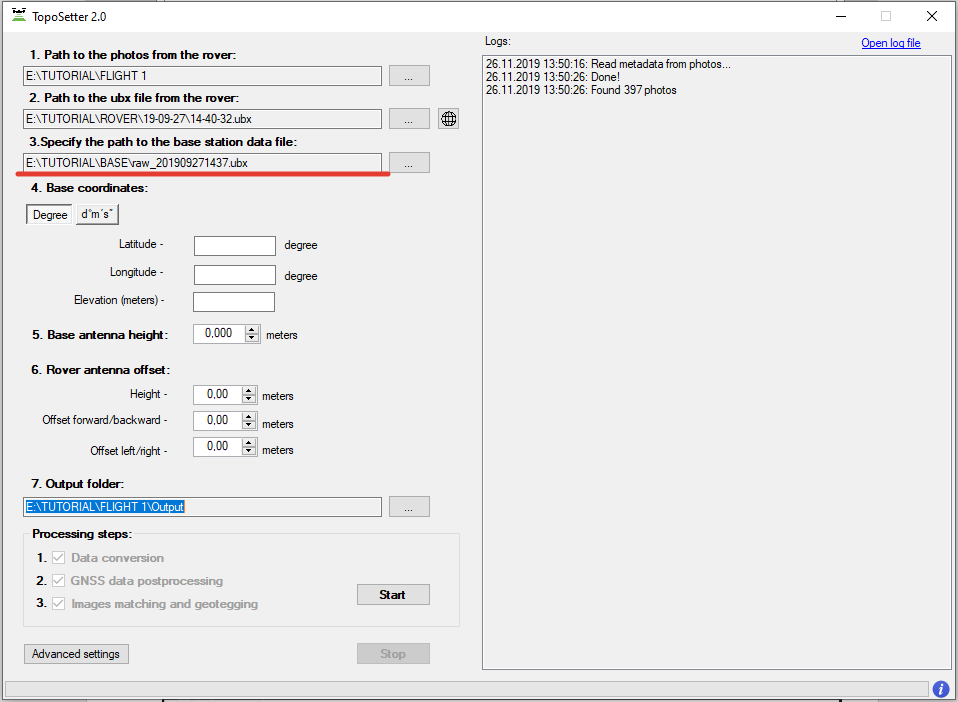
    01
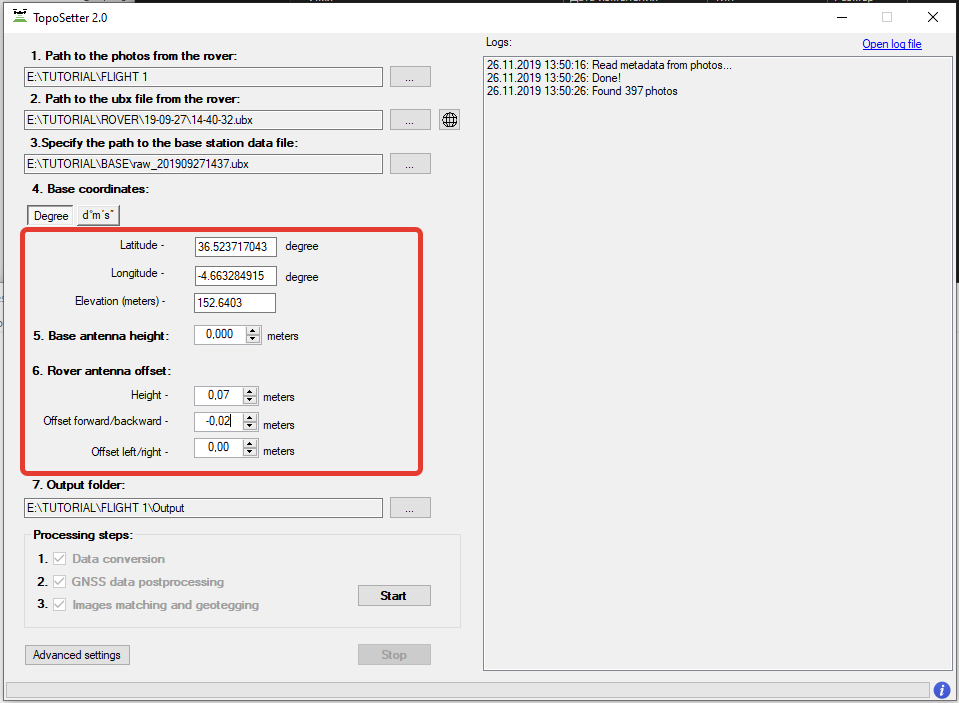
    Step 5. Impute coordinates of the base station in WGS 84. Define antenna offset for a drone. 
    06

    NOTICE. 
    For DJI MAVIC 2 PRO PPK use the following parameters Height: 0.07 Offset forward/backward: -0.02
    For DJI PHANTOM 4 PRO PPK use the following parameters Height: 0.17
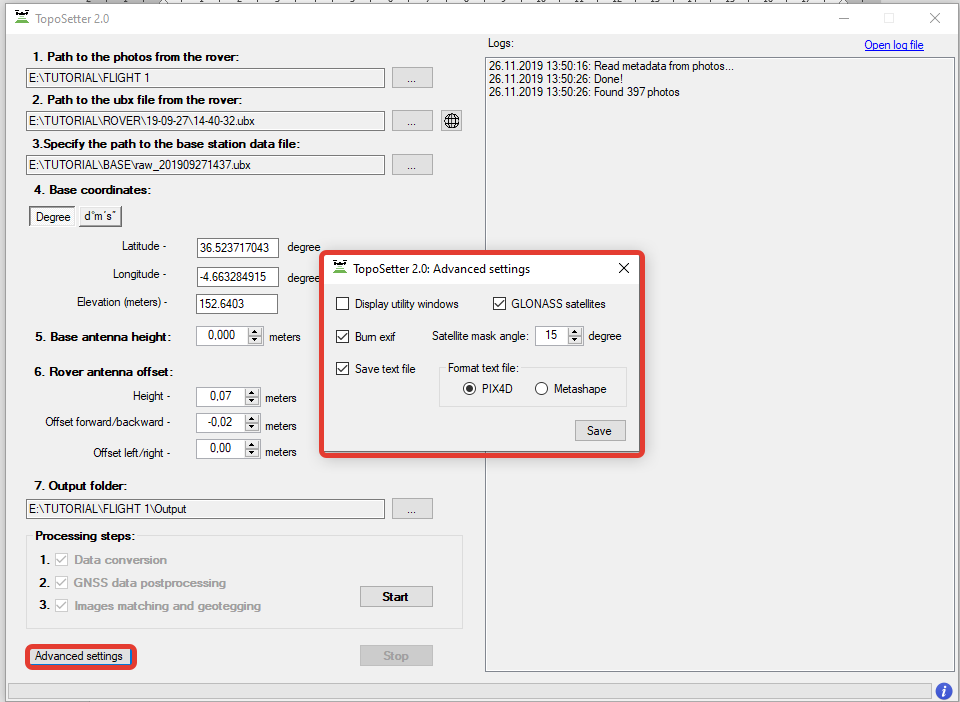
    Step 6. Setup data processing setting. Click advanced settings.
    1. To embed precise coordinates to photos EXIF tags check Burn exif check box. This option may lead increasing of data processing time.
    2. To save list of coordinates check Save text file check box. Select format of text file. 

    Click Save button.
    08

    NOTICE. To look at data processing performing switch on Display utility window option.

    Click Start button.

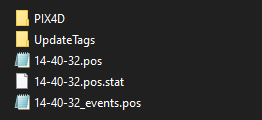
    After finishing of all steps of data processing (data conversion, GNSS data post processing, images matching and geotagging) all results will be stored in Output folder.

    File Coordinates.txt is stored in Pix4D or Metashape folder. Photos with updated EXIF tags are stored in UpdateTags folder. Files with .pos extension are results of GNSS data postrpocessing.
    09

    NOTICE. Coordinate system is WGS84
    Step 7. Checking processing results.
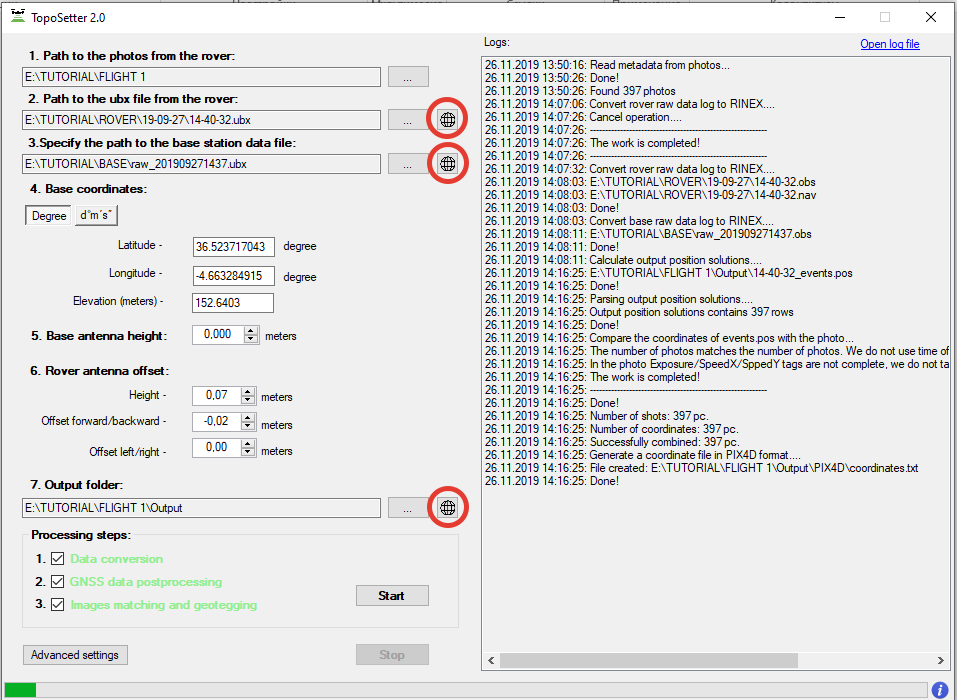
    After processing accomplishing, the following buttons will appear.
    07

    NOTICE. 
    Click the circled (on the image) buttons in front of Rover or Base fields to open GNSS observation files and to check the quality of GNSS signal.
    To check quality of GNSS data postprocessing click the circled button in front of output results
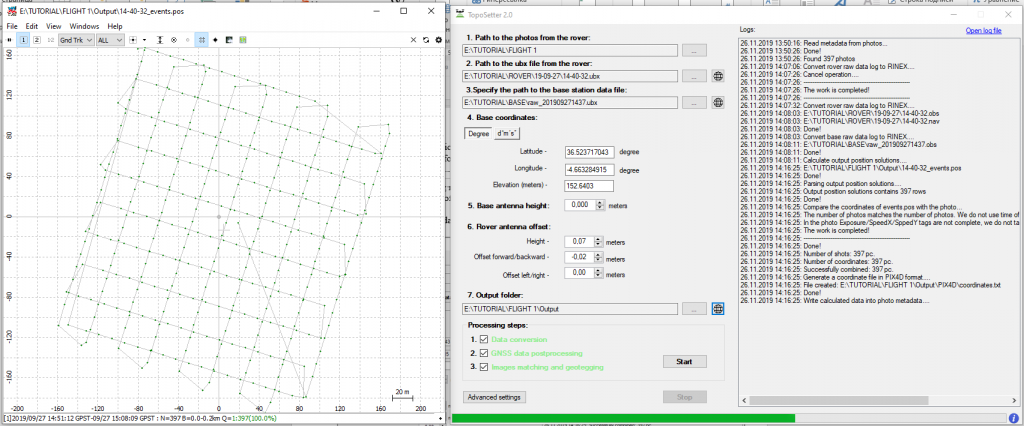
    On the map you can see results of GNSS data postprocessing. Green points of photos events – Fixed solution Yellow points – Float solution Red points – Single solution

    05

    NOTICE. If there are only red points on the map it means, that GNSS data from a drone and a base station were not collected at the same time. If there are only yellow points (float solution) you should check coordinates of a base station or quality of the signal. To remove noisy GNSS signal try to increase satellite mask angle or exclude GLONASS satellite in Advanced setting menu.

    • Comments
    Loading comments ...
    Back to the list
    • Staff
    • News
    • Reviews
    • Vacancy
    • Licenses
    • Documents
    • Partners
    Subscribe to the newsletter of our news and stocks
    Subscribe to
    Connect with us
    +41 21 588 02 11
    +41 21 588 02 11 09:00-18:00 whatsapp.svg
    Sales [email protected] email.png
    Support [email protected] email.png
    Telegram Channel @topodronesa tg.svg
    Telegram Chat @topodronesagroup tg.svg
    Telegram Bot @topodronecombot tg.svg
    Facebook @topodronesa ycz1c9257s6gh7g315r8q6tob3bnddba.png
    Youtube @topodronesa youtube.png
    LinkedIn @topodrone 9ratq3v3eavnhupo1akvxp0sbx4vopj5.png
    X @topodrone twitter.png
    Instagram @topodrone tpxkj71axu6dxt423lwj5idzwcej1njx.png
    Email
    [email protected] - Sales
    [email protected] - Support
    The address
    TOPODRONE SA, Rue de la Gare 13, 1820 Montreux, Switzerland
    Working hours
    10:00-18:00
    [email protected] - Sales
    [email protected] - Support
    TOPODRONE SA, Rue de la Gare 13, 1820 Montreux, Switzerland
    Products
    Sales
    Brands
    Services
    Applications
    Company
    Staff
    News
    Reviews
    Vacancy
    Licenses
    Documents
    Partners
    Information
    Requisites
    Help
    Payment
    Delivery
    Warranty
    FAQ
    © 2026 TOPODRONE SA
    Privacy Policy
    Main page Product 0 Comparison Contacts Blog Applications